
Workspace
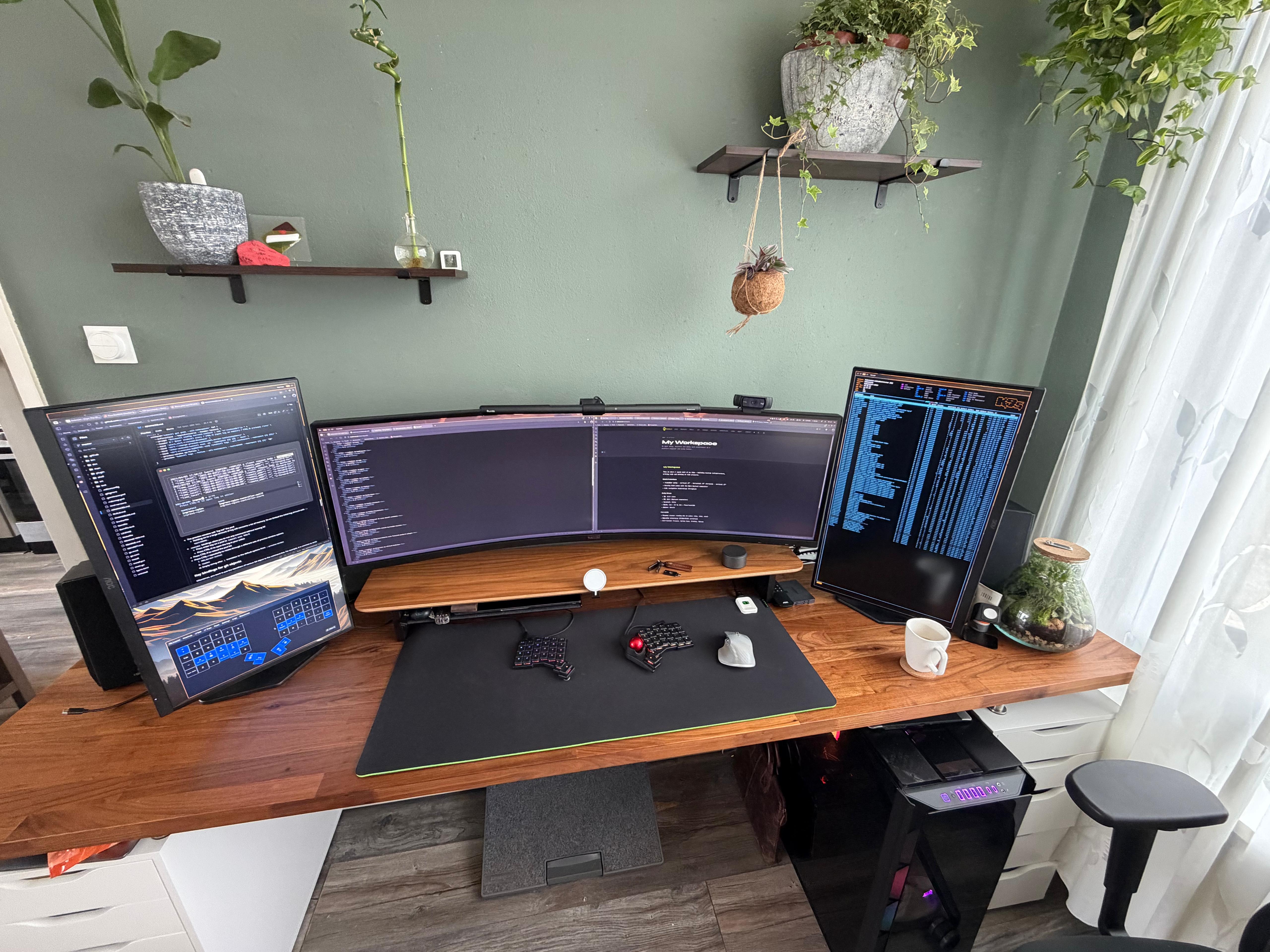
This is where I spend most of my day: building infrastructure, writing code and working on side-projects. Everything is deliberately chosen for comfort and productivity, from the heated desk base to the split keyboard.
Monitors
A 3-monitor setup with an emphasis on wide work surfaces and vertical side screens for documentation, terminal or monitoring.
| Position | Model | Resolution | Refresh rate | Refresh rate |
|---|---|---|---|---|
| Centre | AOC AG493US3R4 - 49" Super Ultrawide | 5120 × 1440 | 120 Hz | 120 Hz |
| Left | AOC Q27G4ZR - 27" QHD | 2560 × 1440 | 144 Hz (vertical) | |
| Right | AOC Q27G4ZR - 27" QHD | 2560 × 1440 | 144 Hz (vertical) |
The middle screen is a 49-inch curve ultrawide, effectively two 27-inch QHD screens side by side in one bezel. The side screens are vertical for long logs, man-pages and dashboards.
PC
An AMD-based workstation for daily use. For quick tests, I occasionally run something in Docker; the actual homelab runs elsewhere.
Casing
- Corsair iCUE 1000D Super Tower
- 14× Corsair fans controlled by 2× Corsair Commander PRO
- ASUS ROG AURA LED controller for RGB synchronisation
Hardware
| Component | Specification |
|---|---|
| Motherboard | ASUS ROG Crosshair VIII Hero (Wi-Fi) |
| CPU | AMD Ryzen 9 3900X, 12 cores / 24 threads @ 3.6 GHz |
| RAM | 64 GB DDR4 3200 MHz, 4× 16 GB Corsair Vengeance |
| GPU | NVIDIA GeForce RTX 2080 Ti |
| Storage | 2× Samsung 970 EVO 1 TB NVMe, 480 GB SSD, 4 TB HDD (3.5"), 2 TB HDD (2.5"), 2× 4 TB Samsung 860 QVO |
| Network | Realtek RTL8125 2.5 GbE + Intel I211 1 GbE + Intel Wi-Fi 6 AX200 |
Keyboard & input
ZSA Voyager - my everyday keyboard. A split ortholinear keyboard with low profiles. Fully programmable via the Oryx configurator. Combined with the ZSA Navigator, a small button/dial I use for volume, scrolling and shortcuts.
Logitech MX Keys - lying on the desk as a backup or for times when I need a full keyboard.
Logitech MX Master 3 - my primary mouse. Pleasant for precise tasks.
Logitech MX Ergo - a trackball for the days when I want to spare my wrist for a while. Stands next to the MX Master.
Desk & chair
Desk: IKEA hack with a large desktop on 2× ALEX drawer units. Lots of storage space, sturdy, and just the right height.
Chair: Gispen Zinn Smart NPR, a Dutch office chair that is fully adjustable. Definitely one of the better investments for someone who sits for 8+ hours daily.
Mouse pad & heater
Razer XXL mouse pad - covers almost the entire desk surface.
Underneath is a Gobesty heated desk mat (900 × 400 mm). Waterproof, 7 heat settings. Indispensable in winter: the heat soaks through the Razer mat and keeps your hands warm.
Lighting
Philips Hue Bloom on the desk for mood lighting and as a bias light behind the monitors.
Philips Hue LED strip under the desk, gives a neon glow along the floor. Both are controlled via Home Assistant. The automations go pretty far: from a popup on the monitors with picture when the doorbell rings, to flashing lights when I have an appointment, to red light when I'm on a call. Just because it can be done and I like it.
Quntis monitor lamp - an LED lamp that clips onto the top of the middle screen. Anti-blue light, auto-dimmer, infinitely adjustable colour temperature. Illuminates the keyboard and desk without reflection on the screen.
Balolo Setup Cockpit
A wooden monitor riser from Balolo that organises the desk and utilises the space under the middle screen. Modular design with various extensions:
- Setup Cockpit Large - the basic, wooden riser with storage space
- Large compartment - additional storage compartment under the platform
- MagSafe holder - wireless charger for the iPhone, integrated into the cockpit
- Tablet holder - holds the iPad M2 upright next to the screen
- Apple Watch holder - fixed place for the Watch at the end of the day
- Cable holder - cable tray at the bottom for a tidy desk
Audio & communication
Edifier R1700BT - bookshelf speakers, black. Connect via Bluetooth or line-in. Warm sound, compact for their volume.
Jabra Evolve 75 - wireless over-ear headset. Active noise cancellation, excellent microphone quality for calls. Connects via the Jabra Link 370 USB dongle.
Elgato Wave 3 - USB condenser microphone on a low-profile arm, tucked away behind the desk. Much better sound quality than headset microphone, without being in sight.
Logitech C920 HD Pro - webcam for videocalls.
Software
OS: Arch Linux - rolling release, full control, no compromises.
Window manager: Niri (in use, under evaluation)
The choice of window manager has a history. For years I ran qtile on X11, satisfied with its configuration, Python-based setup and workflow. But with three high-resolution screens, X11's limits became increasingly palpable. Switching to Wayland was inevitable.
Tried first: Hyprland. Technically strong, active community, but the project is carried by one person. That still gives an insecure feeling in the long run when you build your daily workplace on it.
Now: Niri. A Wayland compositor with a scrolling layout of workspaces. Stable, but I'm not completely satisfied with it. Searching and launching applications feels less fluid than I was used to. I'm actively looking further.
Besides Niri, I also use Dank Material Shell (DMS), a complete desktop shell for Wayland compositors. DMS replaces separate tools like waybar, mako and fuzzel into one: bar, notifications, app launcher, lockscreen. With qtile, you had to configure all that together yourself, which is powerful but also time-consuming.
| Tool | |
|---|---|
| Terminal | Kitty |
| Shell | Zsh + Oh My Zsh + Powerlevel10k |
| Editor | Neovim with Lazy.nvim |
| File Manager | Yazi |
| Multiplexer | tmux |
| Kubernetes CLI | kubectl |
| Kubernetes TUI | k9s |
| Navigation | HJKL throughout the environment |