
By default, WooCommerce always displays the same featured products — until you change them manually. For shops with a large product range, this is a missed opportunity. Auto-Featured Products takes care of this automatically: every day, 10 different products are featured, and yesterday’s products are removed from the spotlight.
The plugin is free and is available on GitHub: github.com/siekman-io/auto-featured-products
What does the plugin do?
- Automatically selects 10 products to feature each day
- Removes the ‘featured’ status from the previous day’s products
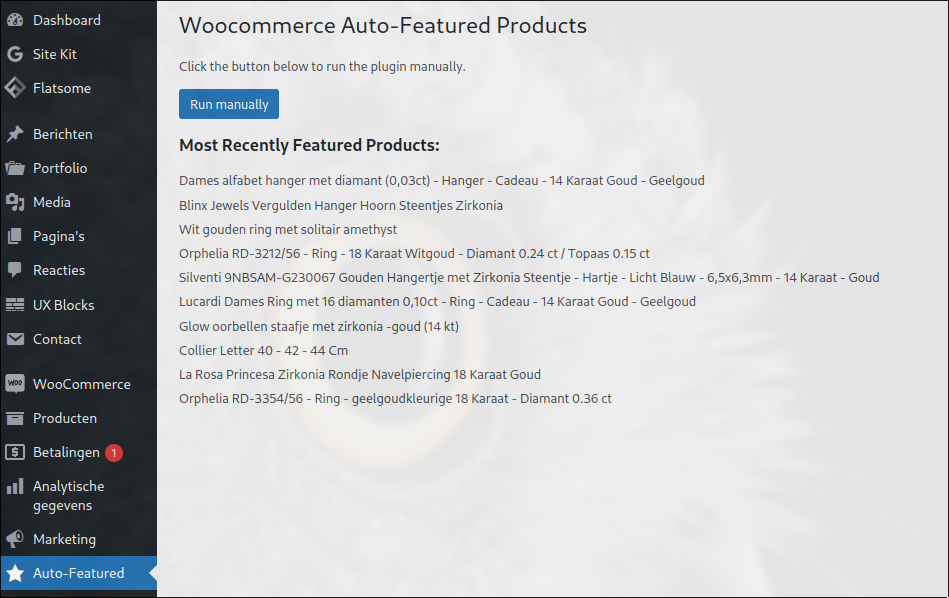
- Manual rotation possible via the admin dashboard
- Admin overview showing recently featured products
- WP-CLI support for use in scripts and cron jobs
Installation
Via the WordPress dashboard:
- Go to Plugins → Add New → Upload Plugin
- Upload the plugin’s
.zipfile - Click Install Now and then Activate
Via FTP:
Unzip the zip file and upload the folder to /wp-content/plugins/. Then activate the plugin via Plugins in the WordPress dashboard.
Once activated, Auto-Featured will appear as a menu item in the WordPress admin bar.
Usage
The plugin runs automatically via a daily WordPress cron job (wpscheduleevent). You don’t need to configure anything else.
If you want to carry out the rotation straight away without waiting, use the manual button in the admin dashboard.
WP-CLI
If you have server access, you can also trigger the rotation via the command line:
wp auto-featured runIt’s handy to schedule this as a server cron job rather than a WordPress cron job:
# crontab — daily at 06:00
0 6 * * * cd /var/www/yoursite && wp auto-featured run --allow-root
How it works
The plugin uses WooCommerce’s built-in product status. In WooCommerce, featured products have the _featured field set to yes. With each rotation:
- All currently featured products are set to
no - 10 random products are selected and set to
yes - The admin overview is updated with the new selection
No custom database tables, no extra overhead — it relies purely on existing WooCommerce functionality.
How many products are featured each day?
By default, 10 products per day. The previous day’s products automatically lose their featured status.
Can I trigger the rotation manually?
Yes, there is a manual option in the admin dashboard to carry out the rotation straight away without waiting for the daily task.
Does the plugin work with WP-CLI?
Yes, you can trigger the rotation using `wp auto-featured run` — handy for cron jobs on the server.
Lees het origineel in het Nederlands
← Lees in het Nederlands